

Introduction to Gemini AI
Gemini is Google’s AI assistant built to help with writing, research, summarizing, idea generation, and everyday productivity tasks.
It can draft content, answer questions, generate outlines, explain complex topics, and assist with planning projects. It also connects naturally with Google tools, which makes it useful for users already working inside Docs, Gmail, and other Google products.
For side hustlers, Gemini works well for quick drafts, research support, and structured idea development. It’s designed to help you move from concept to organized output without overcomplicating the process.
This guide explains how Gemini fits into real side hustles, where it performs best, and how it compares to other AI tools in practical workflows.
How To Get Gemini
What Gemini Actually Does
Gemini is an AI assistant designed for:
- Answering questions
- Explaining topics
- Summarizing information
- Generating structured outlines
- Drafting short-form content
- Supporting research tasks
It works especially well when you need clarity on a topic before writing or producing content.
Instead of starting from scratch, users often use Gemini to build a structured foundation — then refine elsewhere if needed.
That research-first strength is what makes Gemini useful in side hustle workflows.
How People Actually Use Gemini to Support Online Income

Gemini doesn’t pay you directly.
The income comes from how you use it to research, organize, and move ideas forward.
Gemini helps people create:
- Blog outlines
- Research summaries
- Email drafts
- Content briefs
- Product descriptions
- Social media captions
- Planning documents
- Structured idea lists
The faster you gather information → the faster you organize it.
The faster you organize it → the faster you can publish or deliver.
Why Gemini Works for Side Hustles
Most creators slow down during the research and planning stage.
They:
- Spend too long gathering information
- Get overwhelmed by options
- Struggle to organize ideas
Gemini helps reduce that friction.
1️⃣ It Speeds Up Research
You can quickly understand a topic before turning it into content or a product.
2️⃣ It Helps Organize Ideas
Gemini is strong at turning messy thoughts into bullet points, sections, and structured lists.
3️⃣ It Supports Quick Drafting
For shorter pieces like emails, captions, or summaries, it helps you move from idea to usable draft quickly.
How Gemini Fits Inside a Real AI Workflow
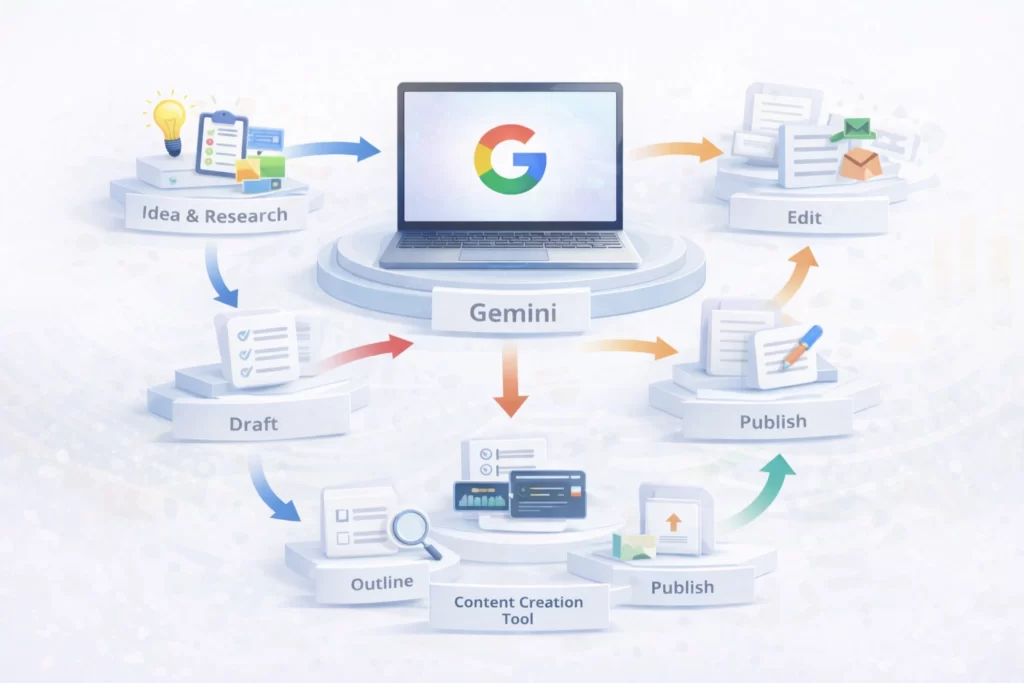
Gemini is often used at the beginning of a workflow.
A typical structure might look like:
Idea → Gemini Research → Draft → Edit → Publish → Repurpose
Or:
Question → Outline → Content Creation Tool → Publish
Gemini handles clarification and structure.
Other tools handle deeper writing, visuals, or automation.
Used alone, it’s helpful.
Used as the research layer inside a system, it adds speed and direction.
Lab Note: Context Makes Gemini Smarter
Quick Tip: Gemini performs best when it understands your environment.
If you’re working inside Google Docs, Gmail, or Sheets, give it real context — paste your draft, reference your goal, and explain your audience.
In the Lab, we treat Gemini as a collaboration engine, not just a chatbot. The more situational context you provide, the more useful the output becomes.
Essential Gemini Terminology
| Term | What It Means |
|---|---|
| Prompt | The instruction or question you type into Gemini to generate a response. |
| Model | The AI engine powering Gemini. Different versions may focus on speed, reasoning, or multimodal capabilities. |
| Gemini Advanced | The paid version of Gemini that offers more powerful models and expanded capabilities. |
| Workspace Integration | Gemini features built directly into Google Docs, Gmail, Sheets, and other Google tools. |
| Multimodal | The ability to understand and generate text, images, and other types of input in a single conversation. |
| Context Length | The amount of information Gemini can process and remember during a conversation. |
| API Access | A developer interface that allows apps and websites to connect to Gemini programmatically. |
Frequently Asked Questions About Gemini for Side Hustles
Gemini is commonly used for blog outlining, marketing copy drafts, email writing, and document refinement. Because it integrates with Google Docs and Gmail, it fits naturally into business workflows. Many creators build repeatable systems using methods outlined in our AI Workflows Guide.
Yes. Gemini works well for drafting SEO-friendly content outlines and refining articles inside Google Docs. It’s most effective when paired with keyword research and editorial review. Publishers often integrate it into structured content systems to increase output consistency.
Absolutely. Gemini’s integration with Google Workspace lowers the learning curve. If you’re already using Docs or Gmail, you can start enhancing your workflow immediately. Beginners often combine it with tools featured in our Beginner AI Stack to build simple, repeatable systems.
It depends on your workflow. Gemini has a strong advantage inside Google Workspace environments. If your side hustle relies heavily on Docs, Sheets, or Gmail automation, it can feel seamless. We compare structured tool positioning inside the AI Tools Lab to help you decide.
Gemini can assist with drafting comparison content, product summaries, and structured outlines. However, strategy and compliance still matter. It works best when used as a productivity assistant rather than a shortcut.
Gemini performs best as a collaboration assistant inside document-based workflows. If your focus is organized research, content drafting, and structured publishing inside Google’s ecosystem, it fits naturally into scalable systems.
 Alex Carter