

Featured Articles
Welcome to the stacks bench.
This is where scattered tools stop floating around your desktop…
…and start behaving like an actual system.
A Tool Stack is what happens when we stop asking “What’s the best AI tool?”
and start asking “Which tools work best together?”
In this lab, stacks are how we:
- Reduce overwhelm
- Cut unnecessary tools
- Build workflows that don’t fall apart
- Turn curiosity into something usable
🧪 Lab Note: Most problems with AI aren’t caused by bad tools — they’re caused by bad combinations.
What Is a Tool Stack? 🧠
A tool stack is a small, intentional group of AI tools, each with a clear job.
Not a pile.
Not a wishlist.
A setup.
Think of it like this:
- AI tools = individual instruments
- Tool stacks = a working rig
- workflows = what you build with it
Stacks sit right in the middle of the SideHustleLab system.
Where Tool Stacks Fit in the Lab System
Here’s how everything connects (and yes, order matters):
🧪 Experiment Gone Wrong: Skipping straight to workflows without a stack usually leads to confusion, not progress.
Start Here: Recommended Tool Stacks ⚗️
Below are the core stacks we use and recommend in the lab.
Each stack explains:
- Who it’s for
- What it’s best at
- How complex it is
- Which workflows it supports
No mystery ingredients. No bloated setups.
🧠 Best AI Stack for Beginners

If you’re new to AI, this is the safest place to start.
Best for:
- Learning how tools work together
- Writing, content, and simple workflows
- Keeping things manageable
🧪 Lab Note: A simple stack you actually use beats a powerful stack you never touch.
💸 AI Stack Under $50
For careful experimenters watching their budget.
Best for:
- Free and low-cost tools
- Testing ideas before committing
- Proof-of-concept workflows
🎨 AI Stack for Creators
Designed for output and consistency.
Best for:
- Video
- Images
- Publishing workflows
- Content creation
🧪 Experiment Insight: Creator stacks prioritize speed and repeatability over perfection.
⚙️ AI Stack for Passive Systems
Built for systems that reduce manual work.
Best for:
- Automation
- Scheduling
- Repeatable workflows
→ AI Stack for Passive Systems
🧪 Lab Note: Automation works best after you’ve done the process manually a few times.
How to Choose the Right Tool Stack
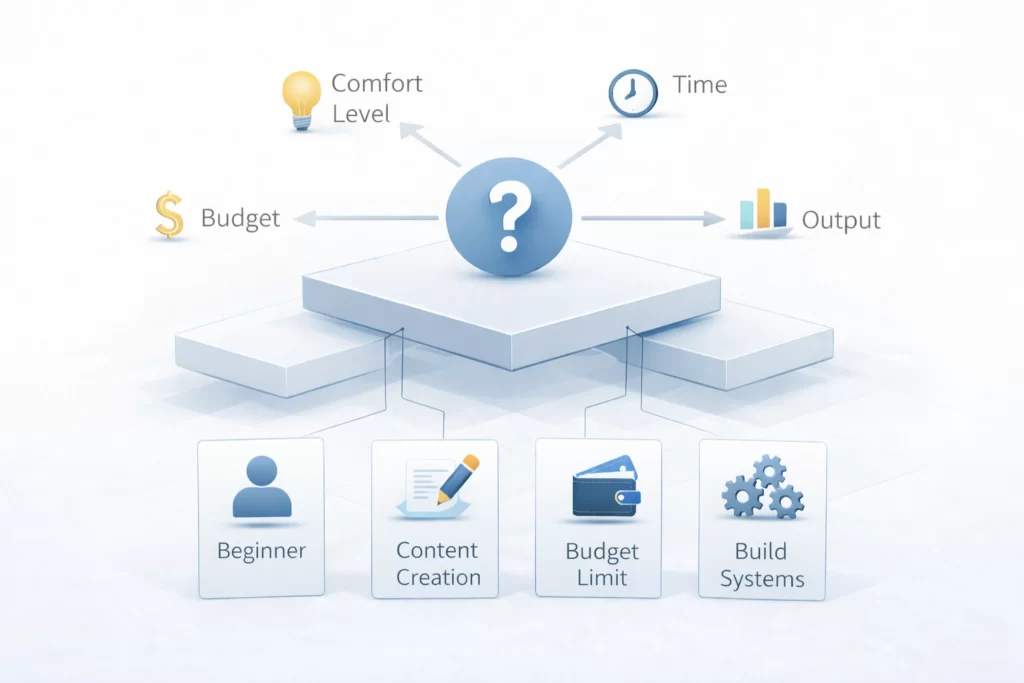
There is no “best” stack for everyone.
The right stack depends on:
- Your comfort level with tools
- Your available time
- Your budget
- The type of output you want
Quick guidance from the lab:
- New to AI? → Start simple
- Creating content? → Focus on output
- Tight budget? → Limit tool count
- Building systems? → Add automation last
If you’re unsure:
→ Best AI Stack for Beginners
Tool Stacks vs Individual Tools
Here’s a common misconception:
“If I just find the right tool, everything will click.”
Tools explain capability.
Stacks explain usage.
You don’t need:
- The newest tool
- The most popular tool
- The most expensive tool
You need:
- Tools that work well together
- In a workflow you’ll actually use
That’s what stacks are for.
How Stacks Are Built and Updated 🔬
Stacks are not permanent fixtures.
They’re updated based on:
- Tool changes
- Pricing shifts
- Workflow improvements
- What survives real use
If a tool no longer fits the stack, it’s replaced.
🧪 Lab Note: A good stack evolves. A bad one gets abandoned.
Where to Go Next 🚪
Not sure where to head now?
- Want to explore tools individually?
→ AI Tools Lab - Want to see how tools connect?
→ AI Workflows
Final Note From the Lab 🧪
More tools don’t create better results.
Better combinations do.
Choose one stack.
Use it consistently.
Then improve it.
That’s how systems are built.
AI Tool Stacks FAQ: Find Your Perfect Workflow
An AI Tool Stack is a curated collection of software and applications designed to work together to automate or enhance a specific business process. At SideHustleLab AI, we test these combinations to ensure they are compatible, affordable, and effective for creators and entrepreneurs.
Many of the tools we recommend offer free tiers or “freemium” models. We prioritize accessibility in our beginner stacks, ensuring you can start building without significant upfront costs.
No. Most of the tools featured in our AI Tools Lab are “no-code” or “low-code” solutions. We focus on user-friendly interfaces like ChatGPT, Canva, and simple automation platforms that anyone can master with a little practice.
The AI landscape moves incredibly fast. Our team, led by Alex Carter, reviews and updates our stacks regularly to replace outdated tools with newer, more efficient, or more cost-effective alternatives.
Absolutely. While our stacks are optimized for specific workflows, AI tools are often modular. You can take a content creation tool from one stack and pair it with a marketing tool from another to create your own custom AI workflow.
We use a “Laboratory” approach. Each tool is put through a series of real-world tests—such as speed of output, quality of results, and ease of integration—before it earns a spot in one of our featured stacks.
Essential AI Stack Terminology: Building Better Systems
| Term | Lab Concept |
|---|---|
| Tool Stack | An intentional group of tools layered to handle a complete business function. In the lab, we prioritize interoperability—ensuring Tool A talks to Tool B. |
| Workflow | The step-by-step logic of how information moves through your stack. See our Workflow Guide for visual breakdowns. |
| Tech Bloat | When a stack contains too many overlapping tools, leading to high costs and confusion. The Lab’s mission is to strip stacks down to the essentials. |
| Friction Point | Any step in a workflow where you have to manually copy-paste or fix an error. We use Automation to bridge these gaps. |
| API Integration | The technical “bridge” that allows different tools in your stack to exchange data automatically without human intervention. |
| Scaling | Increasing output without increasing manual work. A well-built Passive System Stack allows for infinite scaling. |
| Starter Stack | A low-cost, 2-3 tool setup designed for beginners. We recommend starting with the Beginner Stack. |
| Output Quality | The final result of your stack (text, video, revenue). In the Lab, we measure a stack’s success by its end-product, not its features. |
Lab Note: Treat AI Like a Conversation
Quick Tip: Don’t worry about writing the “perfect” instruction the first time. In this lab, we treat the AI’s first answer as just a starting point.
If you don’t like what it says, just tell it why. You can say “make this shorter” or “say this in a friendlier way.” You’ll learn much faster by chatting back and forth than by trying to get it right on the first try. This is how real
workflows are actually built!
 Alex Carter