


Introduction to CapCut
CapCut is a video editing tool designed to make short-form content fast and simple to produce.
It allows users to trim clips, add captions, apply effects, insert music, and format videos for platforms like YouTube Shorts, TikTok, and Instagram. CapCut also includes AI features such as auto-captions, background removal, and basic script-to-video tools.
For side hustlers, CapCut is useful when turning ideas into publish-ready videos without learning complex editing software. It works well for social clips, repurposed content, faceless videos, and quick promotional edits.
This guide explains how CapCut fits into content workflows, where it performs best, and how it compares to other video editing tools.
How To Get CapCut
What CapCut Actually Does
CapCut is a video editing tool that:
- Trims and arranges clips
- Adds captions and subtitles
- Inserts music and sound effects
- Applies transitions and effects
- Formats videos for vertical platforms
- Includes AI features like auto-captions and background removal
Instead of learning complex editing software, users can assemble videos quickly with a simplified interface.
That speed is what makes CapCut practical for content-driven side hustles.
Why CapCut Works for Side Hustles

Many creators avoid video because editing feels complicated.
They:
- Get overwhelmed by professional editing tools
- Spend too long formatting clips
- Struggle with captions and pacing
- Delay publishing
CapCut reduces that friction.
1️⃣ It Simplifies Editing
Basic trimming, transitions, and formatting are straightforward.
2️⃣ It Speeds Up Short-Form Content
Auto-captions and templates reduce production time.
3️⃣ It Supports Consistent Publishing
Faster editing means more consistent output.
How People Actually Use CapCut to Build Online Income
CapCut doesn’t pay you directly.
The income comes from the videos you edit and publish.
CapCut helps people produce:
- YouTube Shorts
- TikTok videos
- Instagram Reels
- Faceless videos
- Product promos
- Repurposed blog content
- Simple explainer clips
The faster you can edit → the faster you can publish.
The more consistently you publish → the more opportunities you create.
How CapCut Fits Inside a Real AI Workflow
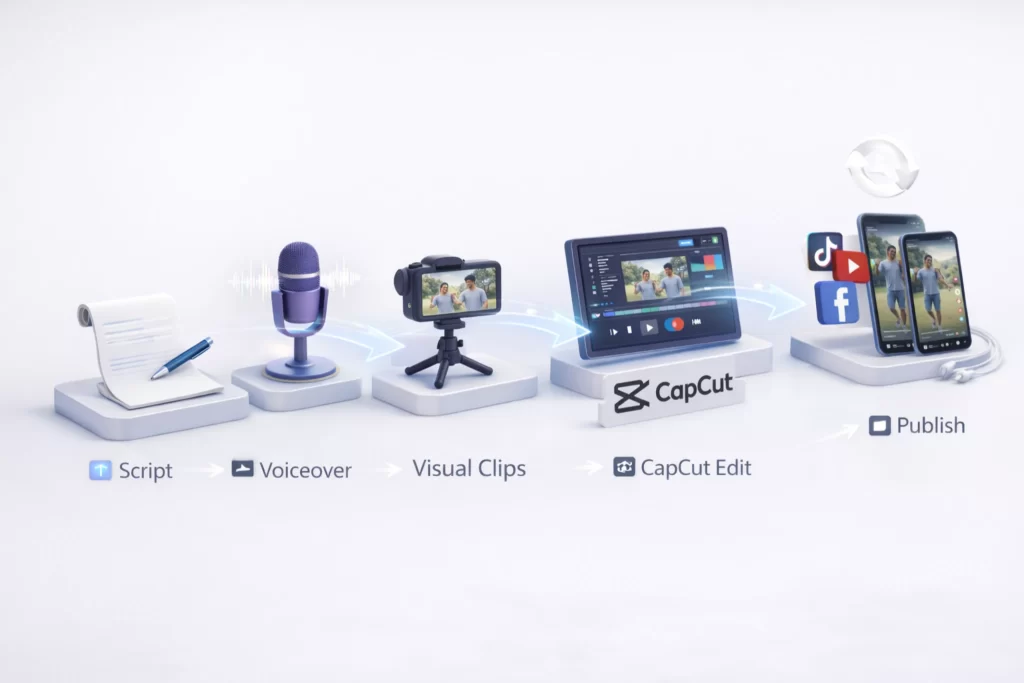
CapCut usually handles the editing stage.
A typical workflow might look like:
Script → Voiceover → Visual Clips → CapCut Edit → Publish → Repurpose
Or:
Blog Post → Extract Key Points → Build Short Clips → Post Across Platforms
CapCut handles video assembly.
Other tools handle scripting, visuals, and automation.
Used casually, it helps polish content.
Used consistently, it supports scalable short-form video systems.
Lab Note: Cut Ruthlessly
Quick Tip: Most videos are too long — not too short.
CapCut works best when you remove filler, tighten pacing, and keep the strongest moments. Attention is currency.
In the Lab, we treat CapCut as a moment amplifier. Trim the excess, sharpen the hook, and let the strongest 30 seconds carry the message.
Essential CapCut Terminology
| Term | What It Means |
|---|---|
| Timeline | The editing workspace where video clips, audio, text, and effects are arranged in order. |
| Auto Captions | AI-generated subtitles created automatically from spoken audio in your video. |
| Templates | Pre-designed video formats that let you create polished content quickly. |
| Transitions | Visual effects that connect one clip to another smoothly. |
| Export Settings | Options that control video resolution, format, and quality when downloading. |
| Aspect Ratio | The width-to-height format of a video (e.g., 9:16 for Shorts, 16:9 for YouTube). |
| Cloud Storage | Online saving feature that lets you access projects across devices. |
Frequently Asked Questions About Making Money With CapCut
Yes. CapCut is commonly used for editing YouTube videos, Shorts, tutorials, and faceless content. Faster editing can support higher publishing frequency, which is important for ad-based and affiliate-supported websites and channels. Many creators integrate it into structured systems outlined in our AI Workflows guide.
Creators often use CapCut to:
Edit short-form videos for social platforms
Create product demos and affiliate content
Produce educational clips and tutorials
Repurpose long-form content into Shorts
These methods often pair with publishing strategies where speed and repeatability are key.
CapCut can help create product reviews, demo videos, and comparison clips. While traffic strategy and compliance still matter, CapCut serves as the production layer for affiliate content. Many creators combine it with tools featured in the AI Tools Lab to build scalable content systems.
Yes. CapCut is beginner-friendly and includes AI features like automatic captions, templates, and background tools. New creators often start with simplified frameworks from our Beginner AI Stack before building more advanced publishing systems.
Yes. CapCut includes AI-assisted editing features such as auto captions, smart trimming, and background tools. These features reduce editing time and help creators focus on scripting and strategy.
CapCut works best as the editing and assembly stage of an AI-powered content system. If your workflow includes scripting, voice generation, and automation, CapCut turns those assets into publish-ready videos that can support ad revenue, affiliate marketing, or digital product promotion.
 Alex Carter